A savings pocket
Add it to the holiday, emergency fund or another goal you choose.
A little closer to your goalYOUR DIGITAL BUDGET BINDER
Meet the personal budget planner that makes space for everyday spending and the things you’re saving for.
Your own pockets. A clear view of what’s left.
A calmer way to plan, one month at a time.
For Android · One-time purchase · No ads
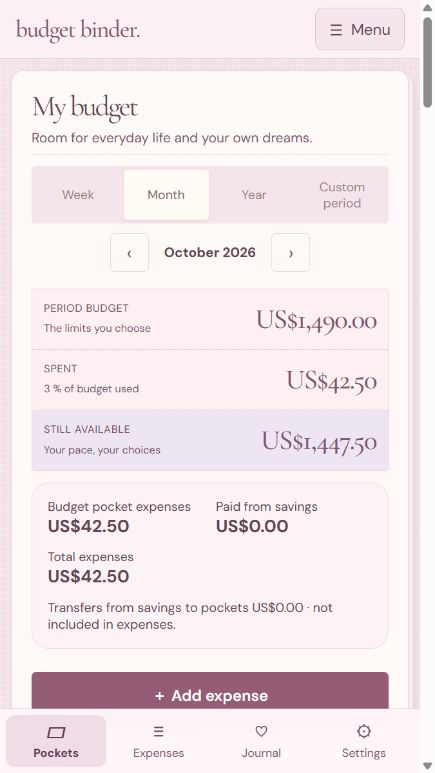
Real app preview · Example entries
LESS GUESSING. A LITTLE MORE CLARITY.
Groceries, home, a weekend away. Give each part of life a pocket, record what you spend and see what’s left. Budget Binder brings your plans together in one gentle, notebook-inspired app.
OPEN YOUR BINDER
Made for the way you plan.
Explore the app’s real screens below.
A PLAN FOR EVERYDAY LIFE
Create budget pockets for anything that matters to you. Set a limit, add expenses and see how you’re doing without losing the bigger picture.
SMALL STEPS. PERSONAL DREAMS.
A holiday. A rainy-day fund. Something just for you. Create several savings pockets, set a target for each and follow your progress.
A THOUGHTFUL MONTH-END MOMENT
Review each pocket at the end of the month. Choose what happens to a surplus or overspend, then confirm your month when you’re ready.
Browser app preview with example entries. Tap to enlarge.
MAKE ROOM FOR WHAT’S NEXT
At month-end, decide what happens to each pocket’s balance. A good plan can make space for both next month and something you’re looking forward to.
Went over budget? You can also account for the overspend using a savings pocket or that pocket’s next monthly budget. These are tracking entries; the app does not move money between financial accounts.
A NOTE TO MYSELF
Little habits.
More thoughtful days.
MORE THAN THE NUMBERS
Keep notes for each period, mark no-spend days and look back at previous months. Your yearly journal brings saved notes and no-spend days together.
Name and colour your pockets. Arrange them to suit your routine.
Choose from 18 currencies. Amounts are relabelled, not converted.
Export a backup file and restore it when you need it.
Review the year using your monthly budgets and recorded spending.
PERSONAL MEANS PERSONAL
Your budgets and entries stay on your device. No app account to create, no advertising and no analytics in the app.
You choose where exported backups are saved or shared. Before changing phones or uninstalling the app, export a backup to keep your entries.
Read the app privacy policyA SMALL PURCHASE. YOUR OWN SPACE.
The store price is the only app cost. No subscriptions, no ads and no in-app purchases.
Find it on Google PlayAndroid app · English-language interface
Local price and device compatibility are shown in Google Play.
Plan & Save
Budget Binder is a manual personal budget planner and expense tracker. You choose your budgets and enter your spending yourself. Savings pockets record your plans and progress; they do not hold or transfer money.
No. Budget Binder is a one-time purchase through Google Play. There are no subscriptions, advertisements or in-app purchases. Check Google Play for the price in your country.
Yes. Create several savings pockets with different names and targets, such as a holiday, an emergency fund and a new home. You can track each goal separately.
When closing a month, choose for each pocket whether its surplus goes to a savings pocket or that same pocket’s budget next month. You can also account for overspending using savings or the next monthly budget. Confirm the month once your choices are ready.
Your budgets, expenses and notes are saved on your device. There is no automatic cloud sync. Export a backup file before changing phones, clearing app data or uninstalling. You choose where that exported file is saved or shared, and can restore it in the app.
Choose USD, EUR, GBP, CAD, AUD, NZD, CHF, SEK, NOK, DKK, PLN, CZK, INR, BRL, MXN, ZAR, SGD or HKD. Changing the currency changes the label only; it does not convert existing amounts using exchange rates.
The app promoted here is the Android version on Google Play, with an English-language interface. This website is an introduction to the app. Images show its browser preview with example entries; this site is not a place to enter or manage your own budgets.
Your pockets. Your goals. Your pace.
Start your binder